How to make a grocery list from recipes
To turn recipes into a grocery list: pick the recipes you will cook this week, list every ingredient, merge the duplicates into single lines, cross off what your pantry already has, and sort the rest by store section. Done by hand it takes twenty minutes a week. A recipe app does the same thing in one tap. Here is the full method.
Last updated July 11, 2026
Start from the week, not from the store
The list is a byproduct of a decision: what are we eating this week? Pick your recipes first, whether that is three dinners or a full seven-day plan. Every ingredient you buy then has a job, which is the single biggest lever against waste and impulse buys. A vague list written in the store parking lot cannot do that.
Merge duplicates or buy double
Two recipes need chicken? If your list says chicken twice, you will either buy twice or stand in the aisle doing arithmetic. Combine matching ingredients into one line and add the quantities: 200g in one recipe plus 800g in another is one line reading 1kg. Clemi does this merge automatically whenever recipes share an ingredient, even across languages.
Skip what your pantry already has
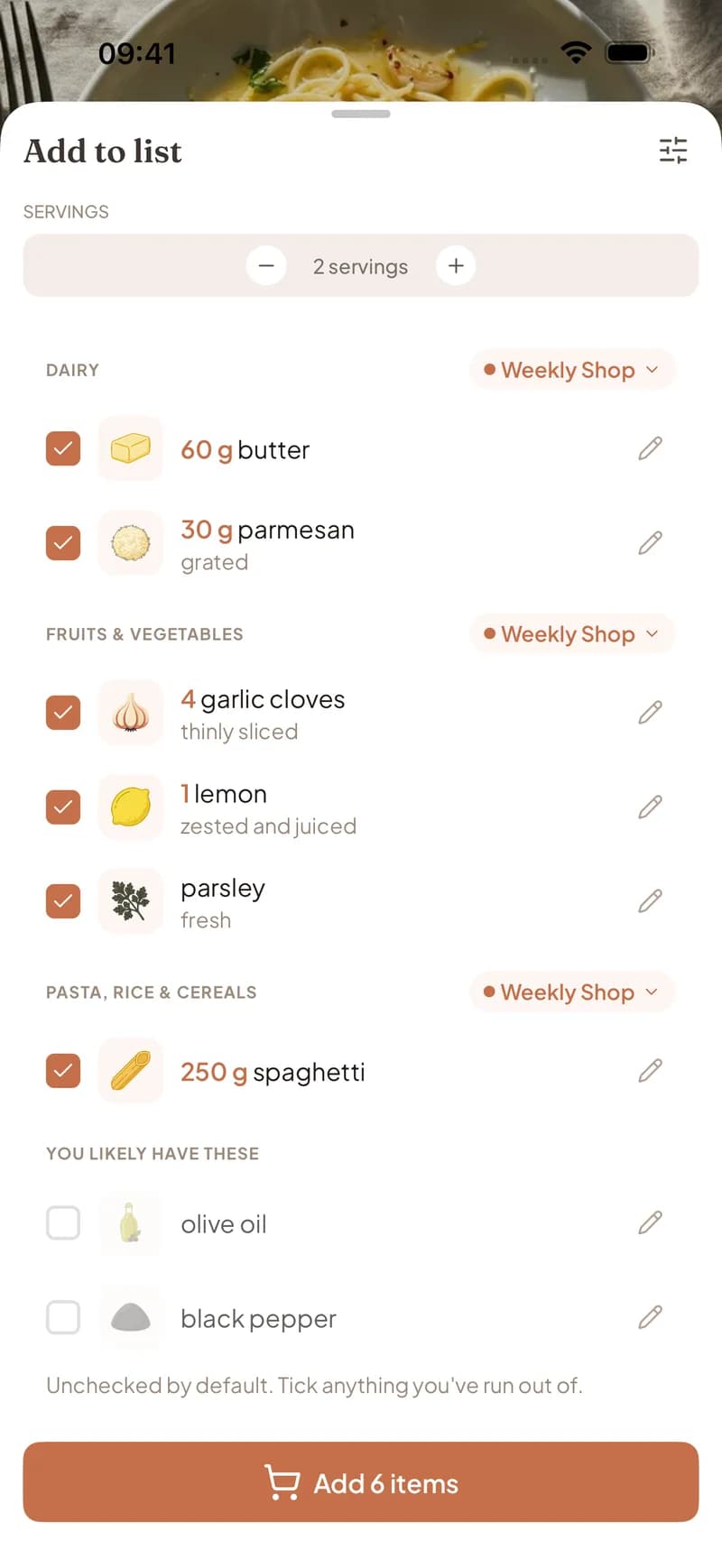
Salt, pepper, olive oil, flour: recipes list them, but you almost never need to buy them. Copying them onto the list creates clutter; deciding one by one creates friction. Clemi separates likely pantry staples into their own group, unchecked by default, so you tick only the ones you actually ran out of.
Sort by aisle so the store goes fast
A list in recipe order has you zigzagging from produce to dairy and back. Group items by store section instead: produce together, dairy together, meat together. Clemi categorizes every item automatically, including things you add by hand, and if your household splits shopping between stores, each section can point to a different list.
The one-tap version in Clemi
- 1
Pick the week's recipes
Plan your meals, or just open any recipe you are going to cook.
- 2
Tap Grocery
Every ingredient is scaled to your servings and grouped by aisle, with pantry staples set aside.
- 3
Review in ten seconds
Tick a staple you ran out of, adjust a quantity, pick which store section goes to which list.
- 4
Shop from one live list
Duplicates are already merged, and your household sees every check-off in real time.
Frequently asked questions
Will the same ingredient from different recipes show up twice?
Not in Clemi. Identical ingredients merge into one line and the quantities add up, so 200g of chicken from one recipe and 800g from another becomes a single 1kg entry.
Can I add things that are not in any recipe?
Yes. Add paper towels, dish soap, or anything else to the same list. Clemi suggests sensible quantities and sorts them into the right store section.
Can I turn a whole week into one list?
Yes. From the meal plan, one tap sends every ingredient from every planned recipe to your grocery list, merged and sorted.
How does the app know what is in my pantry?
Clemi treats common staples like salt, pepper, and olive oil as things you probably have, and leaves them unchecked by default. One tap adds any of them back for the weeks you ran out.
Keep reading
Twenty minutes of list-making, gone
Plan the week, tap once, shop by aisle. Free on iOS and Android.
Get Clemi free